How it works

Tools, not algorithms.

Most photo apps hand you a grid and a search bar and wish you luck. Photo Flashlight hands you tools with some heft to them — a sweep, a stack, a tag — so sorting feels less like data entry and more like handling prints at the kitchen table. Machine learning lends a foothold when you want one; the structure stays yours.

01 · Sweep the grid

Your finger does the choosing.

Drag a finger across the grid and every photo you touch lifts off and gathers into one stack, a little tick landing under your fingertip each time. No checkboxes, nothing left behind — the grid clears as you go, and the next decision gets easier.

02 · Split the stack

The same sweep, one level down.

A stack is everything you just gathered; piles are what you sort it into. Open the stack and the same sweep deals it out — this party, that trip, a maybe pile. One tap tags a whole pile, and yesterday's tags come back as suggestions, so the more you sort the faster it goes.

03 · Empty the inbox

Tag a photo, it's done.

Everything you haven't decided on waits in one place, and the counter ticks down as you go. Set yourself a small daily number if you want the nudge, or don't. Ten minutes at a sitting keeps it moving, and the count only ever goes down.

Tags are not albums

A tag is a way back in.

Albums are for finished collections. Tags are for finding your way back.

Some photo trails will never be albums. The garden through the seasons. The view from the old apartment. Every dog, on every couch you've ever owned. The way your mother set a table.

Nothing you'd sit and browse tonight. But someday you'll want them badly, all at once — and a tag is how they'll be there.

Album

Emma's 10th Birthday

  • Curated
  • Finished
  • Meant to be viewed

PF Tag Thread

Emma's birthdays

  • Ongoing
  • Broad
  • Meant to be returned to

Grouped tag search

Search one tag. Keep the groups.

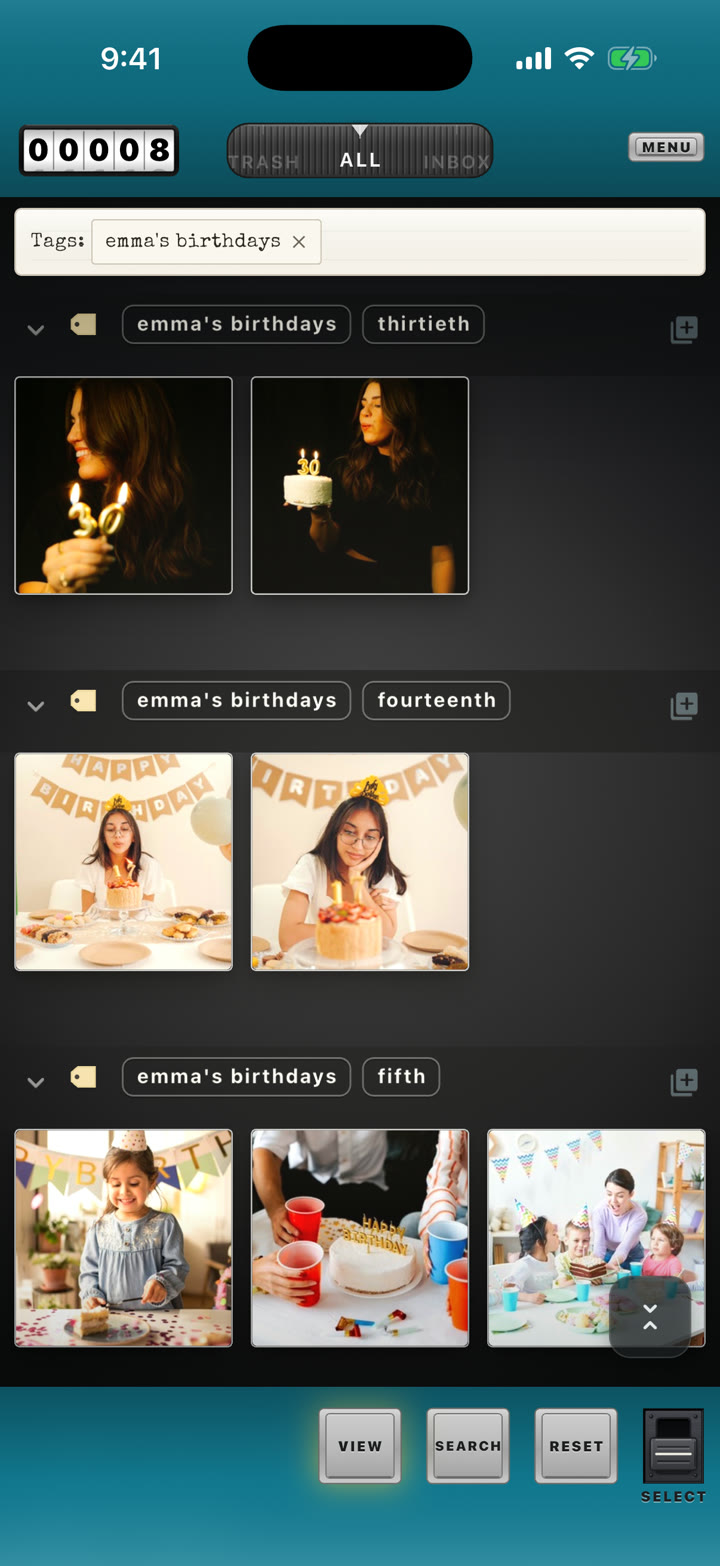
Search Emma's birthdays and Photo Flashlight returns every matching photo — still grouped by the other tags those photos carry.

The whole trail comes back in one pass, and the first birthday, the seventh, the fourteenth each keep their own pile. Easy to scan, nothing buried.

It's also why photos are happy wearing several tags. The birthday at the old apartment belongs to “Emma's birthdays” and “Our first apartment” both — search either trail, and the photo is there, keeping its place in each story.

Emma's birthdays → every year, its own pile Sunday dinners → a decade of tables, grouped The lake house → summer by summer Trips with Dad → every trip keeps its shape Our first apartment → the rooms come back Mom's last visit → all of it, in one place
Photo Flashlight search results for the tag “Emma's birthdays,” grouped into separate birthday sets
One search — every birthday, its own group.

Leave a legacy,
not a pile of rubble.

One purchase, and the whole app is yours. Somewhere in your library are trails worth marking. Name the first one tonight, and the rest will follow.